Your robots.txt Says Yes. Your Firewall Says 403.
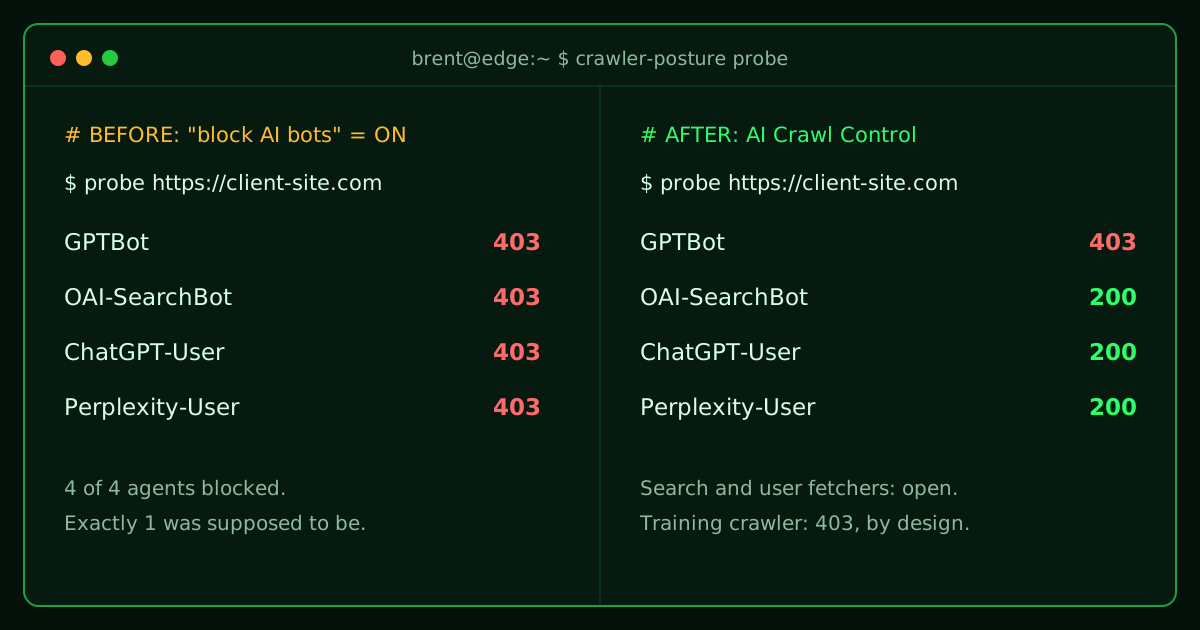
Field note: this happened on a real client engagement this week. The details below are exact; the client is anonymized.
The site was healthy. Fast WordPress, clean structured data, a sitemap fresh to the week. And the robots.txt said exactly the right thing to AI crawlers: search engines welcome, training scrapers keep out.
Then I probed the site the way an AI agent actually sees it. Every single one got the door slammed in its face.
| Agent | What it does | Result |
|---|---|---|
GPTBot | Crawls to train OpenAI models | 403 |
OAI-SearchBot | Indexes for ChatGPT search | 403 |
ChatGPT-User | Fetches live when a user asks | 403 |
Perplexity-User | Fetches live when a user asks | 403 |
Exactly one of those four is supposed to be blocked.
The wrong suspect
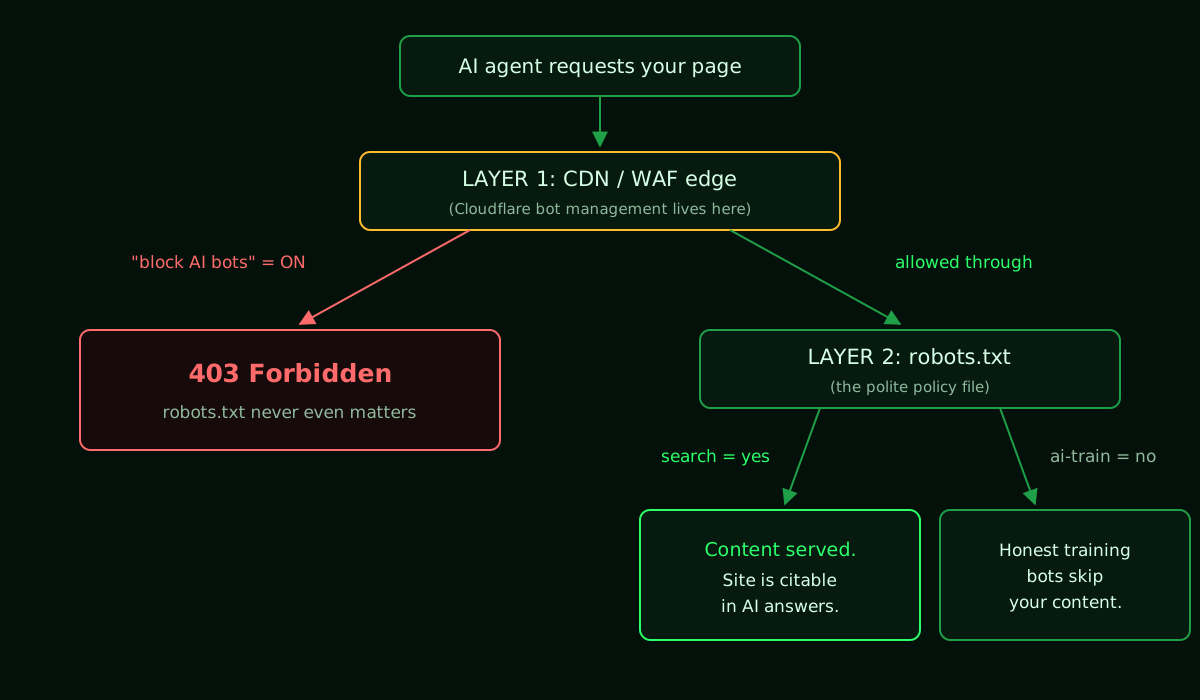
My first guess was a WordPress security plugin being overzealous. Wrong. The robots.txt itself turned out to be Cloudflare-managed, and it was fine. Search: yes. AI training: no. Exactly the posture you'd want.
The problem was one layer up. The Cloudflare zone had AI-bot blocking switched on, a setting that exists to stop training scrapers, but whose blunt version stops every AI agent at the edge. The polite policy file said "come in." The firewall in front of it 403'd everyone before they could read it.
If you've run networks, you've seen this failure before: the routing policy says permit, but there's an ACL on the edge interface dropping the traffic. Intent and enforcement live in different planes. When they disagree, the edge wins. Silently.
What this actually costs you
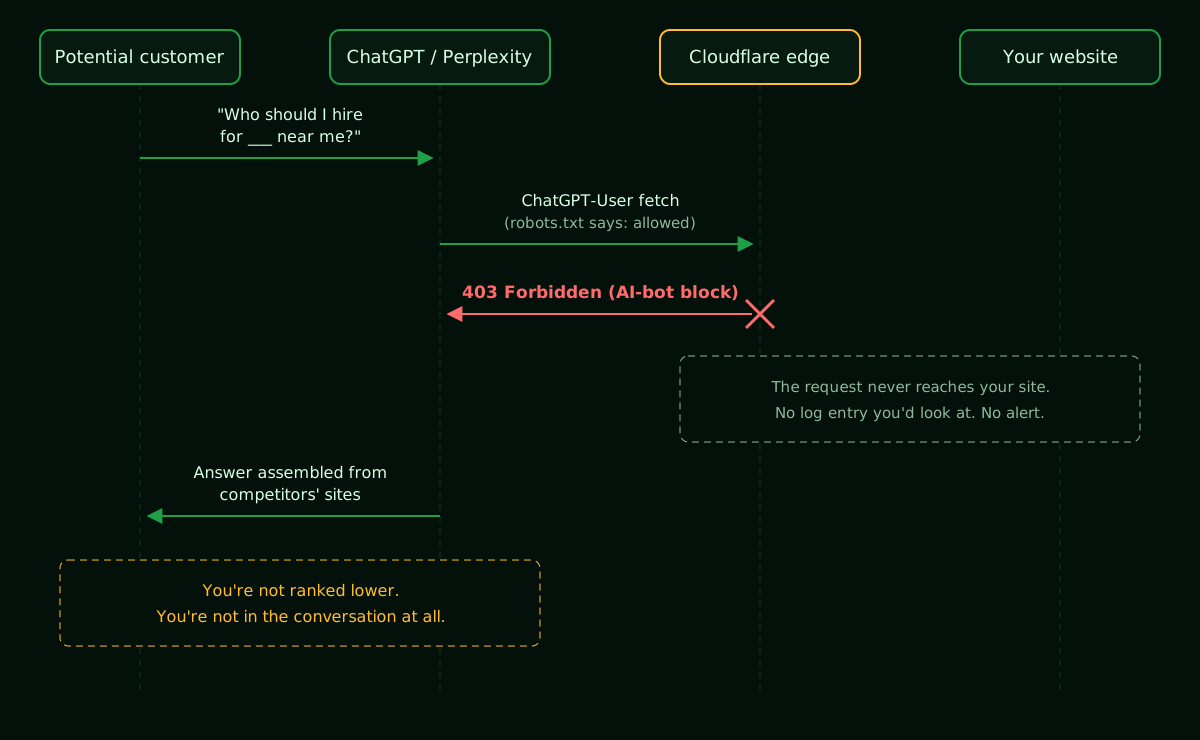
Here's the part that should bother you: there's no error report. When a potential customer asks ChatGPT or Perplexity a question your business should win, the assistant tries to fetch your site, eats a 403, and builds its answer from whoever it can read: your competitors, the directories, Reddit. You don't lose the ranking. You lose the conversation entirely.
Why you should assume this is happening to you
Since mid-2025, Cloudflare blocks AI crawlers by default on new domains, and millions of existing sites have flipped the "block AI bots" toggle, usually with one specific, reasonable intent: do not train your models on my content.
But "AI bots" is not one thing. There are three different kinds of agents knocking, and they deserve three different answers:
- Training crawlers like
GPTBot,CCBot, andGoogle-Extendedharvest content to build tomorrow's models. Blocking these is a legitimate policy choice. - Search indexers like
OAI-SearchBotandPerplexityBotbuild the indexes AI search runs on. Being here is how you get found. - User-triggered fetchers like
ChatGPT-User,Perplexity-User, andClaude-Userfire when a real human asks about you, right now. This is a customer standing at your door.
Blocking category 1 is a values call. Blocking categories 2 and 3 is hanging a CLOSED sign on the fastest-growing referral channel in your analytics. The blunt toggle blocks all three.
The fix took one toggle
In the Cloudflare dashboard: Security → Bots → AI Crawl Control (naming varies a bit by plan). Switch from "block all AI bots" to per-bot control, allow the search indexers and user-triggered fetchers, leave the training crawlers blocked.
Then verify from the outside. Never trust the dashboard alone:
curl -o /dev/null -s -w "%{http_code}\n" -A "ChatGPT-User" https://yoursite.com/
curl -o /dev/null -s -w "%{http_code}\n" -A "OAI-SearchBot" https://yoursite.com/
curl -o /dev/null -s -w "%{http_code}\n" -A "GPTBot" https://yoursite.com/
An hour after the change, same probes, same site:
| Agent | Before | After |
|---|---|---|
OAI-SearchBot | 403 | 200 |
ChatGPT-User | 403 | 200 |
Perplexity-User | 403 | 200 |
GPTBot (training) | 403 | 403, still blocked on purpose |
The site's AI-visibility score went from 69 (B) to 88 (A). And as a bonus nobody predicted: homepage response time dropped from roughly 2.7s to 0.9s once legitimate fetches stopped getting challenged at the edge.
The uncomfortable lesson for auditors (me included)
Most AEO audit tools read your robots.txt and grade you on it. That is how this site initially scored an A on bot access while every AI agent was being 403'd. I'll own my share of it: the first version of a probe I built made the same mistake. It graded the policy file instead of testing the live edge. It does both now, and caps the score when they contradict each other, because a perfect robots.txt behind a 403 wall is worth exactly nothing.
Audit the enforcement, not the intent.
Check your own site in five minutes
curlyour homepage asChatGPT-UserandOAI-SearchBot, from outside your network.- Open your CDN/WAF bot settings and find out what "block AI bots" actually includes on your plan.
- Make training, search, and user-fetch three separate decisions. They're three different questions.
- Re-probe after every security change. The edge doesn't read your robots.txt, and it won't send you an error report.