Patching This Site's MCP Endpoint and Limiting What It Can Do
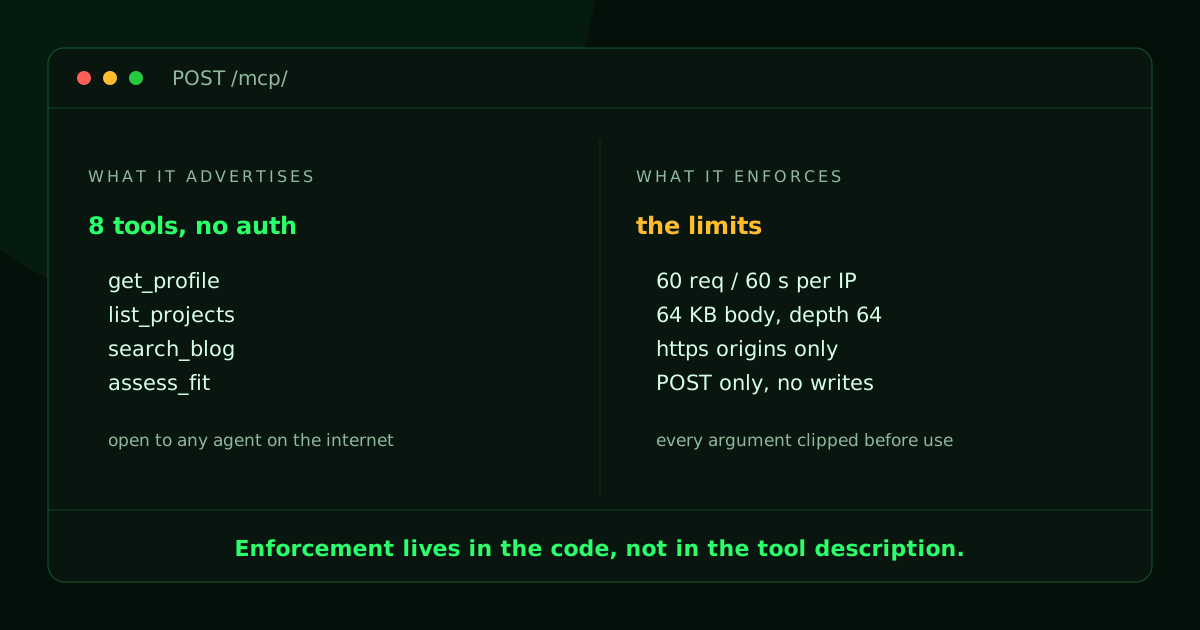
The short version: a Model Context Protocol server bolted onto your website is a public, unauthenticated API with a friendlier name, so treat it like one. Track the spec so new clients can still call it, keep the old handshake for the ones that have not moved, and put hard limits on the rest: read-only tools, a per-IP rate limit, caps on body and argument size, an Origin check, and logs that never store an address.
I put an MCP endpoint on this site back in June, alongside a WebMCP surface in the browser and a plain profile.json. The idea was simple and I still like it: if agents are going to read my site anyway, give them a typed way to do it instead of making them scrape a terminal emulator. That work is written up in Agents Are the World's New First-Class Citizens.
Then I forgot about it, the way you forget any side project that keeps working. Three months later it was still answering, still on the protocol revision it shipped with, still with no rate limit, still echoing whatever string a caller handed it. Nothing bad happened, but nothing happening is not proof that it is safe. It only means not many people have tried.
So I patched it. Here is what changed, why keeping up with the spec is worth the time, and the limits I put on an endpoint that anyone can call.
Why keep up with the spec
The tempting answer is "it works, leave it." Here are three reasons that is wrong.
Clients drop old revisions faster than servers do. MCP has moved through several revisions in about eighteen months. Every one of them tightened the transport: how the version is declared, what a session is, which HTTP verbs mean what. Client libraries follow the new revision because that is where the fixes are. A server frozen on the revision it was born with does not fail loudly. The agent tries, gets a shape it does not recognize, and moves on to a source that answers. For a site whose whole point is being citable, that is the worst failure mode there is, because nothing tells you it happened.
The newer revisions are a better fit for a small site anyway. The modern shape is stateless. Version and capabilities ride on every request instead of being negotiated once and remembered, which means no session store, no session IDs, no expiry logic. On shared hosting that is a straight win. I deleted state instead of adding it. It also adds a discovery call and cache hints, so a well-behaved client can fetch my tool list once an hour instead of on every conversation.
Patching forces you to reread your own code. This is the one I did not expect. Going through the endpoint line by line to update the transport is what surfaced the missing rate limit, the unvalidated request id, and the spot where I reflected the caller's protocol string straight back into the response. The version bump was the reason I opened the file, and rereading the whole thing is what found the problems.
Answering both the old and the new protocol revisions
The upgrade problem is that I do not control my callers. I cannot ship a client update. Anything already pointed at this endpoint has to keep working on the day I deploy, which rules out a clean cutover.
So the endpoint answers both. It advertises the modern revision and three older ones, and it decides which set of rules to apply per request rather than per connection.
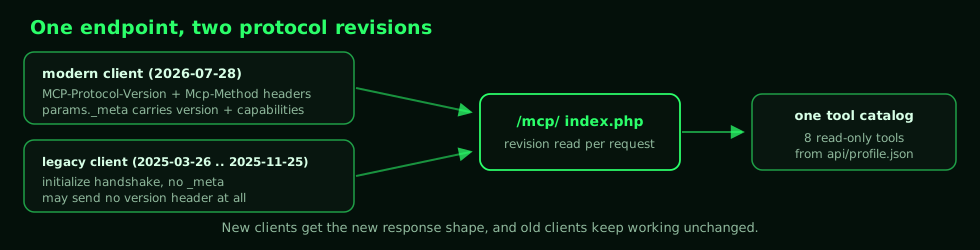
Detection is a short ladder, and the order matters:
if ($rpc === 'initialize') {
    // Asking for the handshake IS the legacy signal.
    $GLOBALS['mcp_era'] = 'legacy';
} elseif ($metaVersion !== null) {
    // Modern clients put the version in params._meta on every call.
    $GLOBALS['mcp_era'] = 'modern';
    validate_modern($rpc, $params, $meta, $metaVersion, $hdrVersion);
} elseif ($hdrVersion !== null) {
    // A header but no _meta: fine for legacy, an error if they claim modern.
    ...
} else {
    // No header at all is allowed, and means the pre-header revision.
    $GLOBALS['mcp_era'] = 'legacy';
}
Which revision it picked then drives three small differences in the reply. Modern results carry a resultType and, on the list calls, cache hints (ttlMs, cacheScope). An unknown method returns HTTP 404 for a modern caller, so it can tell "no such RPC here" apart from "no MCP server here," but returns 200 with a JSON-RPC error for legacy callers that would choke on a 404. The tools themselves are identical in both. Both revisions get the same catalog from the same data file, in a different envelope.
The modern revision also mirrors body fields into HTTP headers so a proxy can route without parsing JSON. That is genuinely useful and it is also a trap, because now two places can disagree. My rule: if they disagree, nobody gets served.
if ($hdrMethod !== $rpc) {
    respond_now([RPC_HEADER_MISMATCH,
        'Header mismatch: Mcp-Method header does not match the body method.'], 400);
}
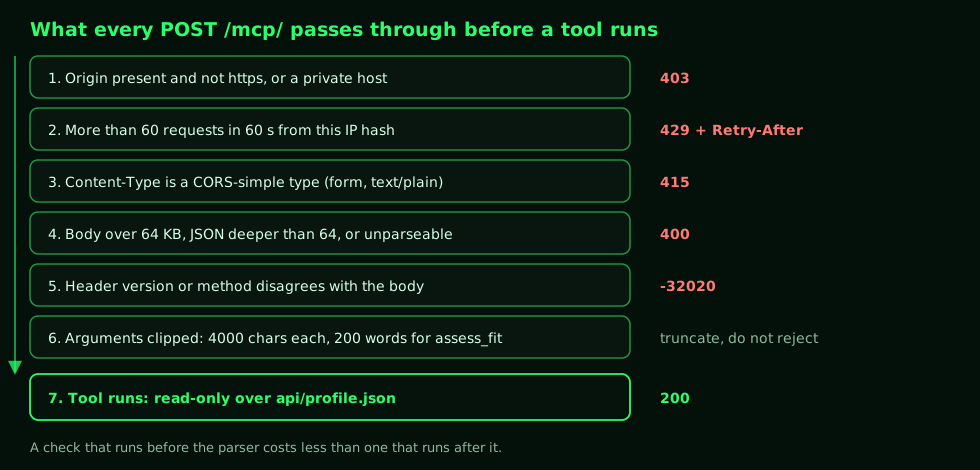
Never pick a winner between the header and the body. A mismatch is either a broken client or somebody probing for a confusion bug, and both deserve the same 400.
The limits I put on it
Here is the part I spent the most time on. An MCP endpoint on a public site has no login, no API key, and no rate plan. Everything that reaches it is anonymous, and some of it is a model that will retry a malformed call two hundred times because a tool description told it to.
I ended up with seven rules. They are ordered by how cheap they are to enforce, on purpose.
1. Every tool is read-only
Every tool on this endpoint reads. Nothing writes, nothing sends mail, nothing shells out, nothing takes a URL and fetches it. The eight tools are lookups over one JSON file that was already public at a stable URL.
That single decision removes most of the threat model. There is no state to corrupt, no queue to flood, no side effect worth chaining. Worst case, somebody reads data I published on purpose, slightly faster than they could have read it by hand.
The temptation to add one write tool is real. A contact form, a "notify me" hook, something small. The moment you do, you own an unauthenticated write path on the internet, and every rule below stops being hygiene and starts being load-bearing. If you need writes, you need authentication first.
2. One data file, and it was already public
The endpoint reads api/profile.json and nothing else. No database, no filesystem walk, no path built from user input. There is no argument a caller can pass that changes which file gets opened, because the path is a constant.
This is why get_project takes an id and loops over an array in memory rather than doing anything clever with a filename. A tool that reads a fixed file cannot be talked into reading a different one.
3. Rate limit before parsing
The limit is 60 requests per 60 seconds per client, and it runs before the body is read, before JSON is decoded, before any protocol logic. The earlier a request gets rejected, the less it costs me.
[$rlOk, $rlRetry] = rate_limit(client_hash());
if (!$rlOk) {
    header('Retry-After: ' . $rlRetry);
    http_response_code(429);
    ...
}
No Redis on shared hosting, so it is a file per shard, keyed by the first two characters of the client hash, guarded by flock, with a fixed window rounded to the minute. Expired entries get pruned on every write and each shard is capped at 400 entries, so the files cannot grow without bound.
Two things here are worth copying. First, always send Retry-After. A 429 with no hint teaches an agent to retry immediately, which is the opposite of what you want. With the hint, a well-built client backs off and a badly built one at least gets a consistent answer. Second, the limiter fails open. If the state directory is not writable, rate_limit() returns "allowed" instead of throwing. I would rather serve an unlimited endpoint for an hour than serve a 500 to every agent that visits because of a permissions change. Your call may differ, but make it deliberately, and write down which way you chose.
4. Cap everything the caller controls
Every attacker-controlled dimension gets a number. These are the ones I picked:
const MAX_BODY_BYTES = 65536;  // request body
const MAX_ID_LEN     = 128;    // JSON-RPC id, if a string
const MAX_ARG_CHARS  = 4000;   // per string tool argument
const MAX_ECHO_CHARS = 120;    // attacker text quoted back in an error
const MAX_FIT_WORDS  = 200;    // bounds assess_fit's word-by-corpus scan
Plus a JSON decode depth of 64, so a deeply nested payload cannot blow the parser before my code ever sees it.
MAX_FIT_WORDS is the interesting one, and it is the bug I would have shipped without the reread. assess_fit takes a job description and scores it against every skill and project. That is a nested loop: unique words times corpus entries. That is fine for a paragraph, and not fine when somebody pastes a novel and repeats the call. Capping the input at 4000 characters bounds the parse, and capping the distinct words at 200 bounds the work. The tool that does the most computation per call needs the tightest bound, always.
Note that arguments are clipped, not rejected. A caller who sends 5000 characters gets an answer based on the first 4000, not an error. Rejecting the call teaches an agent to retry, and truncating it gives the agent something to work with and ends the exchange.
5. Check the Origin, and refuse the browser-friendly content types
An Origin header, when present, has to be https and must not resolve to a private or loopback host, with an explicit exception for localhost over http so developers can work. Anything else gets a 403 before the request is read.
Then a second, cheaper check: reject the three content types a browser can send cross-origin without a preflight.
if (in_array($ctype, ['text/plain',
                      'application/x-www-form-urlencoded',
                      'multipart/form-data'], true)) {
    http_response_code(415);
    ...
}
Requiring application/json means any cross-origin call has to survive a preflight, which means my CORS rules get a vote. It is two lines, and it stops a random page from POSTing to my endpoint out of a visitor's browser without one.
6. POST only, and no echoing strings I did not check
There is no GET stream and no session teardown on this endpoint, so GET, HEAD, and DELETE all return 405 with Allow: POST, OPTIONS. The body of that 405 is still useful, listing the supported versions and pointing at the discovery document, so a confused client learns something instead of just failing.
There was also a reflection bug in version one:
// v1: echo back whatever the caller claimed.
'protocolVersion' => is_string($client) ? $client : PROTOCOL_FALLBACK,
That means a caller could hand me any string and I would put it back in the response. Version two negotiates down to something I actually speak:
$asked  = is_string($params['protocolVersion'] ?? null) ? $params['protocolVersion'] : '';
$agreed = in_array($asked, LEGACY_VERSIONS, true) ? $asked : LEGACY_VERSIONS[0];
The JSON-RPC id gets the same treatment: it must be a non-empty string under 128 characters or an integer, and nothing else. And when an error message has to quote the caller's text back at them, clip() strips control characters and cuts it to 120 characters first. If it came from outside, it does not go back out unedited.
7. Log what was called, not who called it
I want to know what agents are calling and which tools they use. I do not want a file full of visitor IP addresses sitting on a shared host.
So the log line stores a truncated SHA-256 of the address salted with a random value generated on first run and kept at mode 0600. The same visitor produces the same hash for as long as the salt lives, which is all the deduplication I need, and the file is worthless to anybody who steals it. The log rotates at 1 MB, and the whole write is wrapped in a try/catch, because logging must never be able to break the endpoint.
The state directory is denied to the web twice: a Require all denied in mcp/logs/.htaccess, and a RedirectMatch 404 ^/mcp/logs(/|$) in the site root config that survives if the nested file is ever lost. The rate-limit shards and the salt live in there too, so it is one directory to get wrong and I would rather get it right in two places.
The browser side is a different problem
The remote endpoint is only one of the two agent surfaces here. The other is WebMCP, which registers tools with an agent running inside the visitor's browser through navigator.modelContext. The idea is the same, the threat model is not, and the limits are different.
The difference is scope. A remote endpoint is a catalog, so it should expose everything it has, all the time. A WebMCP surface is page context, so it should expose only what makes sense on the page the visitor is looking at. The browser side does not mirror the full catalog. It registers two profile actions an agent on the page would plausibly want, plus the entry point to the interactive easter egg on the homepage, whose own tools appear and disappear as the game progresses.
Three rules I hold to there:
- Nothing in the page is a secret. Anything a WebMCP tool can reach, the visitor can reach with devtools. If a tool would need a key to work, it does not belong in the browser. It belongs behind the server endpoint.
- Tools are scoped and revocable. Register them when the context exists, unregister them when it stops existing. A tool that lingers after its screen is gone is a tool an agent will call at the wrong moment.
- It has to be a no-op when nobody is listening. If there is no agent runtime, there should be no errors, no console noise, and no impact on a human visitor.
One more thing that applies to both surfaces. A tool description is not a security control. Writing "read-only" in a docstring constrains a cooperative model and nothing else. The same lesson showed up when I let an agent drive a lab in Why Your Next Network Lab Might Be Built by an AI Agent: the docstring shapes behavior and the code decides what is possible. Put the boundary in the code. The closest I get to trusting a description is the note field on assess_fit, which tells the caller these are keyword matches and not a conclusion. That is guidance for the model, not enforcement.
What I deliberately did not do
I did not add authentication. The data is public by design and every tool is read-only, so a key would add friction without adding safety, and it would block the exact clients I want.
I did not add bot detection or a CAPTCHA, because the audience is bots.
I did not add streaming. The modern transport supports it, but my longest tool call is a lookup in a small JSON file, and a feature I do not need is one more thing to secure.
I did not add per-tool quotas. 60 requests a minute is already generous for a profile catalog, and one number I can reason about beats six I will not maintain.
Try it
Both revisions answer at the same URL. Here is the legacy shape, which is one line:
curl -sX POST https://brent.leekley.me/mcp/ \
  -H 'Content-Type: application/json' \
  -d '{"jsonrpc":"2.0","id":1,"method":"tools/list"}'
And the modern shape, which mirrors the method into a header and carries the version in _meta:
curl -sX POST https://brent.leekley.me/mcp/ \
  -H 'Content-Type: application/json' \
  -H 'MCP-Protocol-Version: 2026-07-28' \
  -H 'Mcp-Method: tools/list' \
  -d '{"jsonrpc":"2.0","id":1,"method":"tools/list","params":{"_meta":{
        "io.modelcontextprotocol/protocolVersion":"2026-07-28",
        "io.modelcontextprotocol/clientCapabilities":{}}}}'
Change Mcp-Method to tools/call while the body still says tools/list and you get the mismatch error instead of an answer. That is the check working.
The discovery document lives at /.well-known/mcp.json and the underlying data at /api/profile.json. A GET on the endpoint itself returns 405 with the supported versions, which is the fastest way to see what a server speaks without knowing its protocol.
What to do with this
Standing up an MCP server for your site is a couple of hours. Owning one is a recurring chore. Put the version bump on a calendar the way you would for anything else exposed to the internet, because a stale endpoint does not show up as an outage. Agents decide your site is not worth talking to, and nothing tells you.
And when you do sit down to patch it, budget the extra hour to reread the whole file. Mine gave up a reflected string, an unbounded loop, and a missing rate limit, none of which had anything to do with the version change.