From Intent to Reality: Driving pyATS Tests from NetBox Against a CML2 Fabric
Part 2 of a series pairing Cisco Modeling Labs 2 with Cisco pyATS for network programmability. Part 1 built the lab and generated the testbed from CML.
New to NetBox? The official NetBox Zero to Hero course is a quick primer.
In the first post I built a four-node spine-leaf in CML2 and generated the pyATS testbed straight from the lab, so the inventory never drifts from the network. That gave us something solid to stand on: a testbed that connects, and Genie output that comes back as structured data instead of screen-scraped text.
Once the testbed connects it proves we can reach the devices and read them, but before we move on we should check that the configurations are correct. Correct compared to what? You cannot test reality until you have written down what reality is supposed to be.
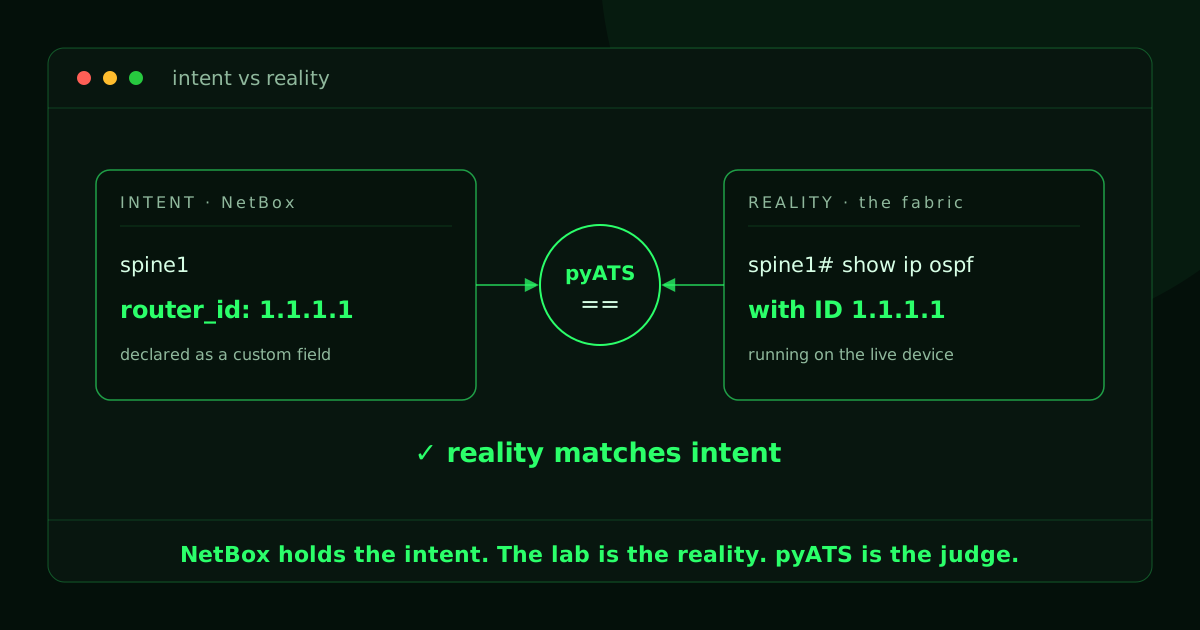
We need a source of truth. We give the network a declared intent and hold it in NetBox. Then we use pyATS to check the live fabric against it. The question we are answering is simple to say and surprisingly easy to leave untested: does the network match what we said it should be?
Takeaway up front: when your intent lives as structured data, "is the network right?" is an easy check. It simply becomes a test that either passes or fails.
Three roles: intent, reality, judge
Our environment is now a clean split of responsibilities. Three things, each doing one job.
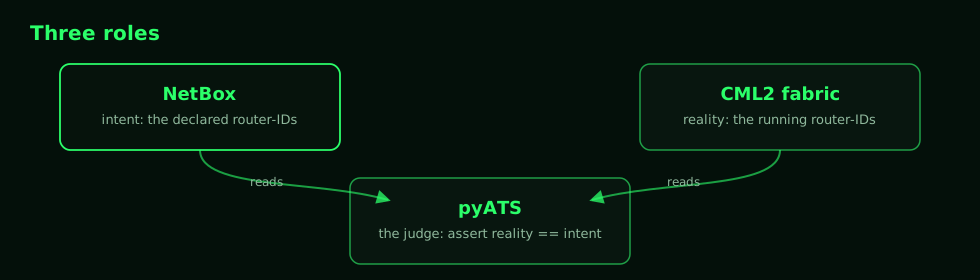
- NetBox is the intent. It is the source of truth for what the network should be. We store the declared OSPF router-ID for each device as structured data.
- The CML2 fabric is the reality. It is the network under test, the same lab from Part 1, with its router-IDs already configured.
- pyATS is the judge. It reads intent from NetBox, reads reality from the live devices, and asserts that they match.
Why router-IDs make a good first check
I am using the OSPF router-ID as the working example on purpose. It is the smallest check… Each device has exactly one, it is easy to declare and to read back, and a mismatch is a real operational problem. A router-ID that drifts from what you designed can split your link-state database in ways that are annoying to chase down later.
In Part 1 we set loopback router-IDs of 1.1.1.1, 2.2.2.2, 11.11.11.11, and 22.22.22.22. They are the values we declare in NetBox and test against.
Prerequisites
- The Part 1 lab running and reachable. The four nodes answer on their management addresses
198.18.250.87through.90. - A NetBox instance. I ran a local one with the official netbox-docker project (NetBox 4.6). Anything you can reach over HTTP with an API token works.
pynetboxon your workstation alongside thepyats[full]install from Part 1.uv add pynetboxorpip install pynetbox.- Credentials in your environment, never in the files. The device login from Part 1 (
PYATS_UNAME/PYATS_PWORD), plus your NetBox endpoint and token.
export NETBOX_ENDPOINT=http://localhost:8000
export NETBOX_TOKEN=...        # an API token from NetBox
export PYATS_UNAME=cisco
export PYATS_PWORD=cisco
If you want the quickest possible NetBox, clone netbox-docker, add a one-line override so the web UI is published on a port you can reach, then bring it up:
# docker-compose.override.yml
services:
  netbox:
    ports:
      - 8000:8080
docker compose pull
docker compose up -dCreate a superuser and an API token from the UI (or have the container create them for you), and you have a source of truth waiting to be filled in.
Step 1: put the intent into NetBox
NetBox does not ship with a field called "OSPF router-ID," and it should not. That is exactly what custom fields are for. We add one custom field named router_id that applies to devices, and that field becomes the home for this slice of intent.
import pynetbox

nb = pynetbox.api(ENDPOINT, token=TOKEN)

# A text custom field on devices: this is where intent lives.
nb.extras.custom_fields.create(
    object_types=["dcim.device"],
    name="router_id",
    label="Router ID",
    type="text",
    description="Declared OSPF router-ID (intent).",
)
The reality test also needs to know how to reach each device, and NetBox already models that as the device's primary IPv4. So when I build the fabric I set two things per device: the declared router_id and the management IP as its primary address. The core of the seeding loop looks like this:
# name -> (mgmt IP, declared router-ID)
FABRIC = {
    "spine1": ("198.18.250.87", "1.1.1.1"),
    "spine2": ("198.18.250.88", "2.2.2.2"),
    "leaf1":  ("198.18.250.89", "11.11.11.11"),
    "leaf2":  ("198.18.250.90", "22.22.22.22"),
}

for name, (mgmt_ip, router_id) in FABRIC.items():
    dev = nb.dcim.devices.get(name=name)
    dev.custom_fields["router_id"] = router_id      # the intent
    dev.save()

    intf = nb.dcim.interfaces.get(device_id=dev.id, name="Ethernet0/0")
    ip = nb.ipam.ip_addresses.create(
        address=f"{mgmt_ip}/24", status="active",
        assigned_object_type="dcim.interface", assigned_object_id=intf.id,
    )
    dev.primary_ip4 = ip.id                          # how to reach it
    dev.save()
You could set all of this in the NetBox UI just as easily. I keep it as a script because the whole series treats the network as something you define once and re-run, and intent is no exception. The full script, including the supporting site, role, and device-type objects NetBox requires, will be added as an appendix.
With that done, the source of truth knows what the fabric is supposed to be:
fabric intent in NetBox:
  spine1   router_id=1.1.1.1        primary_ip4=198.18.250.87/24
  spine2   router_id=2.2.2.2        primary_ip4=198.18.250.88/24
  leaf1    router_id=11.11.11.11    primary_ip4=198.18.250.89/24
  leaf2    router_id=22.22.22.22    primary_ip4=198.18.250.90/24
Two checks, one source of truth
There are actually two different questions hiding in "does the network match intent," and it is worth testing them separately.
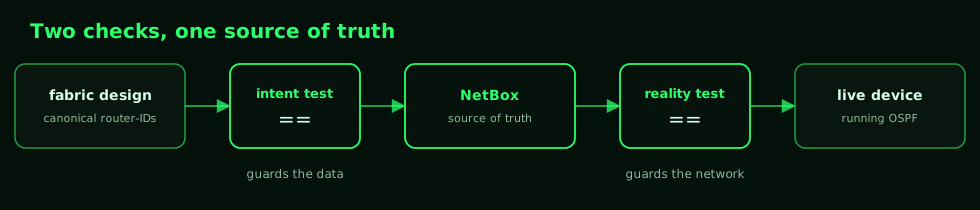
The intent test guards the data. A source of truth can still hold a typo, and if NetBox is wrong then everything downstream is wrong with confidence. So first we check that NetBox agrees with the design. The reality test guards the network. Once we trust NetBox, we check that the live fabric matches what NetBox declares.
Step 2: the intent test (NetBox vs the design)
This one never touches a device. It reads each device's router_id custom field from NetBox and tests it matches the design.
I write it as a normal pyATS aetest so it slots into the same runner as everything else, looping one testcase per device.
import os
import pynetbox
from pyats import aetest

ENDPOINT = os.getenv("NETBOX_ENDPOINT", "http://localhost:8000")
TOKEN = os.getenv("NETBOX_TOKEN")

# The canonical fabric design. NetBox must agree with this.
EXPECTED_ROUTER_IDS = {
    "spine1": "1.1.1.1",
    "spine2": "2.2.2.2",
    "leaf1": "11.11.11.11",
    "leaf2": "22.22.22.22",
}


class CommonSetup(aetest.CommonSetup):
    @aetest.subsection
    def get_netbox_data(self):
        nb = pynetbox.api(ENDPOINT, token=TOKEN)
        self.parent.parameters["netbox"] = {
            d.name: dict(d.custom_fields) for d in nb.dcim.devices.all()
        }

    @aetest.subsection
    def loop_mark(self):
        aetest.loop.mark(TestRouterId, device_name=list(EXPECTED_ROUTER_IDS))


class TestRouterId(aetest.Testcase):
    @aetest.test
    def test_router_id(self, device_name, netbox):
        declared = netbox[device_name]["router_id"]
        expected = EXPECTED_ROUTER_IDS[device_name]
        assert declared == expected, (
            f"{device_name}: NetBox declares {declared}, design says {expected}"
        )
Run it and NetBox checks out against the design, one testcase per device:
|-- common_setup                            PASSED
|   |-- get_netbox_data                     PASSED
|   `-- loop_mark                           PASSED
|-- TestRouterId[device_name=spine1]        PASSED
|   `-- test_router_id                      PASSED
|-- TestRouterId[device_name=spine2]        PASSED
|   `-- test_router_id                      PASSED
|-- TestRouterId[device_name=leaf1]         PASSED
|   `-- test_router_id                      PASSED
`-- TestRouterId[device_name=leaf2]         PASSED
    `-- test_router_id                      PASSED

Success Rate                              100.0%
Step 3: the reality test (the live fabric vs NetBox)
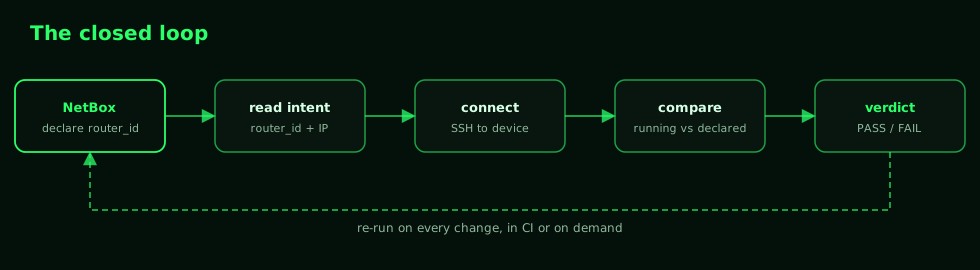
Now the interesting part. For each device we pull both halves of the contract straight from NetBox: the management IP that tells us how to reach it, and the router_id that tells us what it should be. Then we connect, run one command, and check that the running router-ID matches what NetBox declared. Notice that the expected value is no longer hard-coded in the test. NetBox is the source of truth, so the test compares reality to NetBox, not to a second copy of the answer.
import os
import pynetbox
from pyats import aetest
from pyats.topology import Device

ENDPOINT = os.getenv("NETBOX_ENDPOINT", "http://localhost:8000")
TOKEN = os.getenv("NETBOX_TOKEN")
UNAME = os.getenv("PYATS_UNAME", "cisco")
PWORD = os.getenv("PYATS_PWORD", "cisco")


class CommonSetup(aetest.CommonSetup):
    @aetest.subsection
    def get_netbox_intent(self):
        # Pull both halves of the contract from NetBox: how to reach the
        # device (primary_ip4) and what it should be (router_id).
        nb = pynetbox.api(ENDPOINT, token=TOKEN)
        intent = {}
        for d in nb.dcim.devices.all():
            if d.primary_ip4 and d.custom_fields.get("router_id"):
                intent[d.name] = {
                    "ip": str(d.primary_ip4).split("/")[0],
                    "router_id": d.custom_fields["router_id"],
                }
        self.parent.parameters["intent"] = intent

    @aetest.subsection
    def loop_mark(self, intent):
        aetest.loop.mark(TestOspfRouterId, device_name=list(intent))


class TestOspfRouterId(aetest.Testcase):
    @aetest.setup
    def connect(self, device_name, intent):
        self.device = Device(
            name=device_name, os="ios",
            credentials={
                "default": {"username": UNAME, "password": PWORD},
                "enable": {"password": PWORD},
            },
            connections={"cli": {
                "protocol": "ssh", "ip": intent[device_name]["ip"], "port": 22,
            }},
        )
        self.device.connect(log_stdout=False, logfile=False)

    @aetest.test
    def test_router_id(self, device_name, intent):
        declared = intent[device_name]["router_id"]
        output = self.device.execute("show ip ospf | include Process")
        assert declared in output, (
            f"{device_name}: NetBox declared {declared}, device shows: {output.strip()}"
        )

    @aetest.cleanup
    def disconnect(self):
        if self.device.connected:
            self.device.disconnect()
The live fabric agrees with NetBox on every device:
|-- common_setup                                PASSED
|   |-- get_netbox_intent                       PASSED
|   `-- loop_mark                               PASSED
|-- TestOspfRouterId[device_name=spine1]        PASSED
|   |-- connect                                 PASSED
|   |-- test_router_id                          PASSED
|   `-- disconnect                              PASSED
|-- TestOspfRouterId[device_name=spine2]        PASSED
|-- TestOspfRouterId[device_name=leaf1]         PASSED
`-- TestOspfRouterId[device_name=leaf2]         PASSED

Success Rate                                  100.0%
Green across the board is the boring, correct answer. The interesting question is whether the test actually means anything. A test that can only pass is not a test.
Step 4: break it on purpose
Let's make reality disagree with intent. I will change spine1's running router-ID on the device. On spine1:
router ospf 1
 router-id 9.9.9.9
end
clear ip ospf process     # answer yes; the new ID takes effect
NetBox still declares 1.1.1.1. The device is now running 9.9.9.9. Intent and reality have parted ways, and nothing on the box is going to tell you so on its own.
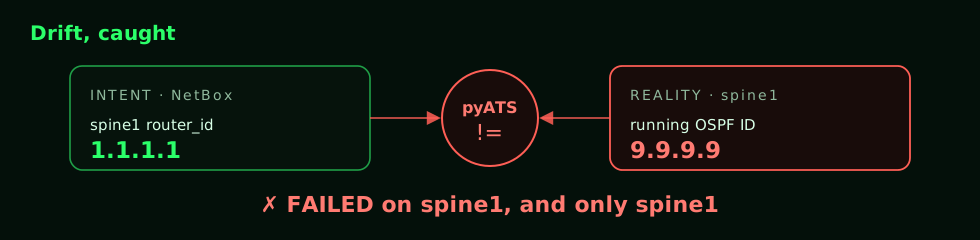
Re-run the reality test, and pyATS catches it cleanly. The assertion message carries both sides of the disagreement, and the failure is pinned to exactly the device that drifted:
AssertionError: spine1: NetBox declared 1.1.1.1, device shows:
                Routing Process "ospf 1" with ID 9.9.9.9

|-- TestOspfRouterId[device_name=spine1]        FAILED
|-- TestOspfRouterId[device_name=spine2]        PASSED
|-- TestOspfRouterId[device_name=leaf1]         PASSED
`-- TestOspfRouterId[device_name=leaf2]         PASSED

 Number of PASSED                                   4
 Number of FAILED                                   1
 Success Rate                                   80.0%
That is the payoff. Not a human noticing months later that something feels off, but a test that fails the moment the network stops matching what you declared, and tells you which device and what the gap is. Set the router-ID back to 1.1.1.1, clear the process again, and the test result goes back to 100 percent.
Where this goes next
Router-IDs are just the example. It generalizes to anything you are willing to declare. Once intent lives in a source of truth as structured data, each field becomes a contract pyATS can enforce against the live network:
- Interfaces and addressing: check the device's IPs and descriptions match what NetBox models for each interface.
- Neighbors and protocols: test the OSPF or BGP sessions that NetBox says should exist are actually up.
- VLANs and ports: assert access and trunk assignments match the intent, port by port.
The rest of the series keeps reusing this lab and the same idea from different angles:
- The snapshot machine:
genie learna baseline, break something on purpose, andgenie diffto see the blast radius. - No lab, no problem: record these devices into pyATS mock devices and run the same tests in CI with nothing booted.
- Beyond the CLI: enable NETCONF, RESTCONF, and gNMI on a node and test model-driven state instead of screen-scraping.
Write the intent down once, and let every run prove the network still matches it.
Appendix: the full seeding script
seed_netbox.py (idempotent, safe to re-run)
#!/usr/bin/env python3
"""Seed NetBox with the spine-leaf fabric's declared intent."""
import os
import pynetbox

ENDPOINT = os.getenv("NETBOX_ENDPOINT", "http://localhost:8000")
TOKEN = os.getenv("NETBOX_TOKEN")

# name -> (mgmt IP, declared router-ID, role)
FABRIC = {
    "spine1": ("198.18.250.87", "1.1.1.1", "spine"),
    "spine2": ("198.18.250.88", "2.2.2.2", "spine"),
    "leaf1":  ("198.18.250.89", "11.11.11.11", "leaf"),
    "leaf2":  ("198.18.250.90", "22.22.22.22", "leaf"),
}

nb = pynetbox.api(ENDPOINT, token=TOKEN)


def get_or_create(endpoint, lookup, **defaults):
    obj = endpoint.get(**lookup)
    return obj or endpoint.create(**{**lookup, **defaults})


# 1. The router_id custom field on devices (this is where intent lives).
if not nb.extras.custom_fields.get(name="router_id"):
    nb.extras.custom_fields.create(
        object_types=["dcim.device"], name="router_id", label="Router ID",
        type="text", description="Declared OSPF router-ID (intent).",
    )

# 2. Supporting objects every device needs.
site = get_or_create(nb.dcim.sites, {"slug": "cml-lab"}, name="CML Lab", status="active")
mfr = get_or_create(nb.dcim.manufacturers, {"slug": "cisco"}, name="Cisco")
dtype = get_or_create(
    nb.dcim.device_types, {"slug": "iol-xe"}, model="IOL-XE", manufacturer=mfr.id
)
roles = {
    r: get_or_create(nb.dcim.device_roles, {"slug": r}, name=r.capitalize(), color="2196f3")
    for r in {v[2] for v in FABRIC.values()}
}

# 3. The four devices, each carrying its declared router-ID and a primary IP.
for name, (mgmt_ip, router_id, role) in FABRIC.items():
    dev = nb.dcim.devices.get(name=name) or nb.dcim.devices.create(
        name=name, device_type=dtype.id, role=roles[role].id,
        site=site.id, status="active",
    )
    dev.custom_fields["router_id"] = router_id
    dev.save()

    intf = nb.dcim.interfaces.get(device_id=dev.id, name="Ethernet0/0") or \
        nb.dcim.interfaces.create(device=dev.id, name="Ethernet0/0", type="1000base-t")
    ip = nb.ipam.ip_addresses.get(address=f"{mgmt_ip}/24") or \
        nb.ipam.ip_addresses.create(
            address=f"{mgmt_ip}/24", status="active",
            assigned_object_type="dcim.interface", assigned_object_id=intf.id,
        )
    if not dev.primary_ip4 or dev.primary_ip4.id != ip.id:
        dev.primary_ip4 = ip.id
        dev.save()
Fabric intent reference
| Device | Role | Declared router-ID | Primary IPv4 (mgmt) |
|---|---|---|---|
spine1 | spine | 1.1.1.1 | 198.18.250.87 |
spine2 | spine | 2.2.2.2 | 198.18.250.88 |
leaf1 | leaf | 11.11.11.11 | 198.18.250.89 |
leaf2 | leaf | 22.22.22.22 | 198.18.250.90 |