The Snapshot Machine: genie learn and diff as a Change-Validation Safety Net on CML2
Part 3 of a series pairing Cisco Modeling Labs 2 with Cisco pyATS for network programmability. Part 1 built the lab, Part 2 tested it against NetBox intent.
Here is a maintenance window you have lived through. You make a small change, run a few show commands, the output looks fine, and you close the ticket. Weeks later something is slow or unreachable, and the root cause turns out to be a side effect of that change, sitting just outside the few commands you happened to check.
The problem is not that you skipped a step. The problem is that "I looked and it seemed fine" does not scale to the size of a routing table. You cannot eyeball every route, every neighbor, and every counter before and after a change and reliably spot the one thing that moved.
So let the tooling do it. Genie can snapshot the operational state of a device as structured data, and it can diff two snapshots and tell you exactly what changed. Take one snapshot before the change and one after, diff them, and the side effects stop hiding. CML2 makes this safe to practice, because you can break things on purpose with zero blast radius on anything real.
Takeaway up front: structured before-and-after diffs catch the side effects that "the show commands looked fine" misses.
The loop: learn, change, learn, diff
The whole workflow is four steps, and it fits inside any maintenance window.
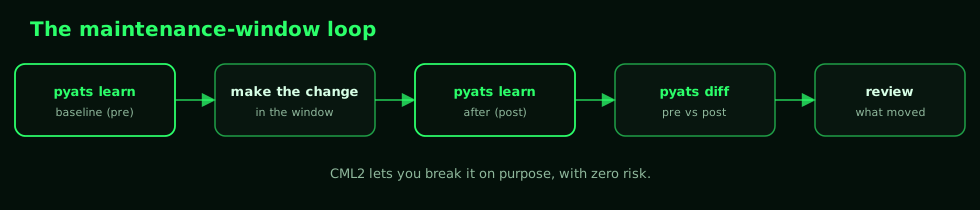
genie learn (exposed on the CLI as pyats learn) connects to a device, runs the show commands behind a feature, and parses them into a structured model. genie diff (as pyats diff) compares two of those models key by key. You are not diffing screen text, you are diffing parsed state, so a route that changed next-hop shows up as a clean before-and-after on that one field.
Snapshot the baseline
I am working against the same four-node spine-leaf from Part 1, snapshotting leaf1. Two features carry this story: ospf (so we see adjacencies and per-interface cost) and routing (so we see the RIB itself). Learn the baseline into a pre_maint directory:
pyats learn ospf routing --devices leaf1 \
  --testbed-file testbeds/testbed.yaml \
  --output output/pre_maint
+==============================================================================+
| Genie Learn Summary for device leaf1 |
+==============================================================================+
| Connected to leaf1 |
| Learnt feature 'ospf' |
| Learnt feature 'routing' |
+==============================================================================+Before we touch anything, it is worth knowing what the baseline says about two destinations, because these are the ones that will move:
22.22.22.22/32   metric 21   via Ethernet0/2 and Ethernet0/1   (two paths, ECMP)
1.1.1.1/32       metric 11   via Ethernet0/1                    (direct to spine1)
leaf1 reaches leaf2's loopback (22.22.22.22) over both spines equally, and it reaches spine1's loopback (1.1.1.1) straight across the direct link. Hold that picture.
The change: a subtle one, on purpose
I am not going to shut an interface. That is too easy to catch, the link goes down and everyone notices. The interesting failure is the quiet one, so I will fat-finger an OSPF cost: bump leaf1's link to spine1 from its default cost of 10 up to 100, the kind of thing that happens when a template lands the wrong value or someone tunes one link and forgets the rest of the fabric reacts to it.
leaf1(config)# interface Ethernet0/1
leaf1(config-if)# ip ospf cost 100
No interface bounced. No protocol restarted. Now learn the after-state into a post_maint directory with the exact same command, and diff the two:
pyats learn ospf routing --devices leaf1 \
  --testbed-file testbeds/testbed.yaml \
  --output output/post_maint

pyats diff output/pre_maint output/post_maint --output output/results
First, what the show commands tell you
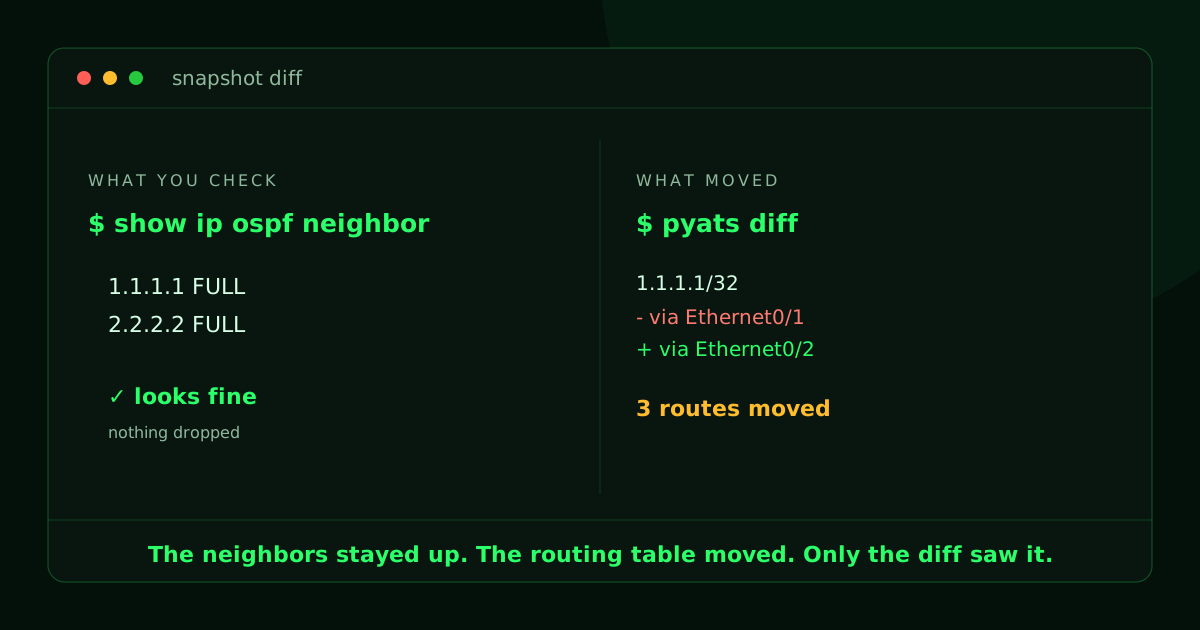
This is the trap. The most natural thing to check after an OSPF change is your adjacencies, so you run show ip ospf neighbor, and it is spotless:
Neighbor ID     Pri   State           Dead Time   Address     Interface
2.2.2.2           0   FULL/  -        00:00:38    10.0.3.0    Ethernet0/2
1.1.1.1           0   FULL/  -        00:00:30    10.0.1.0    Ethernet0/1
Both neighbors are FULL. The adjacency to spine1 over Ethernet0/1 is up, exactly as it was before. A cost change does not drop an adjacency, so every neighbor-facing command you reach for says the same thing: nothing is wrong. You would close the ticket here. The diff is about to disagree.
Reading a genie diff
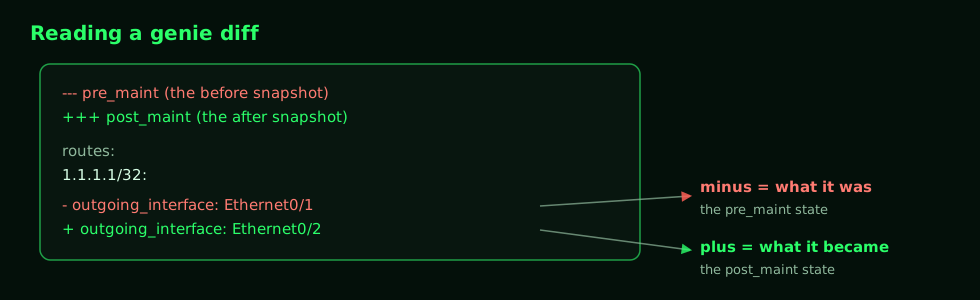
A genie diff reads like a unified diff, but over parsed state instead of text. Lines that start with a minus are the before snapshot (pre_maint), lines that start with a plus are the after (post_maint), and everything else is unchanged context that locates the change in the structure.
The diff run wrote one file per feature that changed:
+==============================================================================+
| Genie Diff Summary between directories                                        |
| output/pre_maint/ and output/post_maint/                                     |
+==============================================================================+
|  File: routing_ios_leaf1_ops.txt                                             |
|   - Diff can be found at output/results/diff_routing_ios_leaf1_ops.txt        |
|  File: ospf_ios_leaf1_ops.txt                                                 |
|   - Diff can be found at output/results/diff_ospf_ios_leaf1_ops.txt           |
+==============================================================================+
What you actually did
The OSPF diff is short and unsurprising. It is the one thing you meant to change:
--- output/pre_maint/ospf_ios_leaf1_ops.txt
+++ output/post_maint/ospf_ios_leaf1_ops.txt
          interfaces:
           Ethernet0/1:
-           cost: 10
+           cost: 100
What actually happened
The routing diff is the whole point of the post. One cost change, and the RIB moved underneath you:
--- output/pre_maint/routing_ios_leaf1_ops.txt
+++ output/post_maint/routing_ios_leaf1_ops.txt
       1.1.1.1/32:
-       metric: 11
+       metric: 31
        next_hop:
         next_hop_list:
          1:
-          next_hop: 10.0.1.0
+          next_hop: 10.0.3.0
-          outgoing_interface: Ethernet0/1
+          outgoing_interface: Ethernet0/2
       10.0.2.0/31:
-       metric: 20
+       metric: 30
         (next-hop moves from Ethernet0/1 to Ethernet0/2)
       22.22.22.22/32:
        next_hop:
         next_hop_list:
-         2:
-          next_hop: 10.0.1.0
-          outgoing_interface: Ethernet0/1
Read that top entry again. 1.1.1.1 is spine1's own loopback. Before the change, leaf1 reached it straight across the direct link on Ethernet0/1. After the change, leaf1 reaches spine1 by going the long way around, out Ethernet0/2 to spine2, across to leaf2, and back up to spine1, at more than double the metric. The direct adjacency to spine1 is still FULL the entire time. You are simply no longer using the direct link to get to the device on the other end of it.
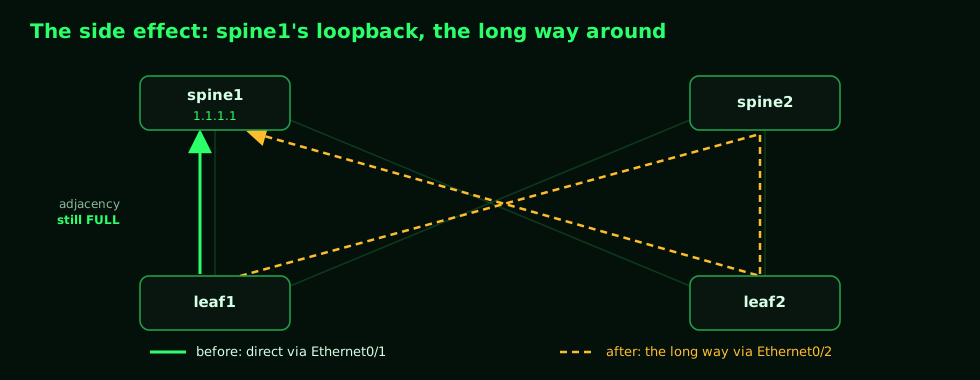
And it is not just that one route. The fabric link 10.0.2.0/31 rerouted the same way, and 22.22.22.22 quietly lost its second equal-cost path, dropping from two next-hops to one. One line of config, three destinations moved, zero adjacencies dropped.
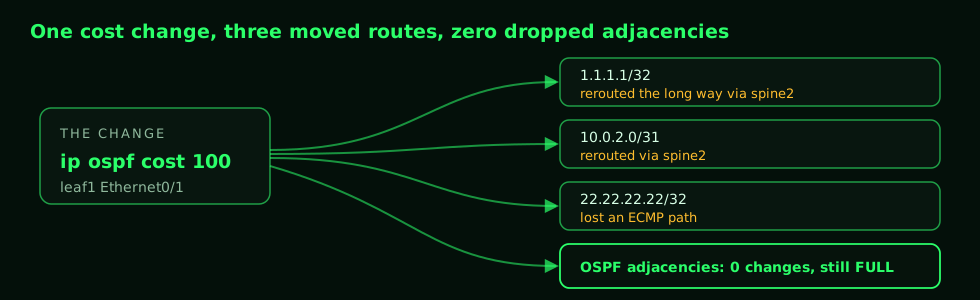
None of this is exotic. It is exactly how OSPF is supposed to behave. That is the point: the routing table did the right thing, the change still had consequences you did not intend, and the only thing that surfaced them was a structured before-and-after diff. A neighbor check would have sent you home happy.
Make it a habit
The reason to wire this into a real maintenance routine is that it costs almost nothing and it is honest in a way that eyeballing is not.
- Snapshot wide, not just the feature you are touching. I learned
ospfandroutinghere, but a cost change touched routing, not OSPF adjacency state. If I had only snapshotted the feature I was changing, I would have missed the blast radius. Learn the neighbors of your change, not only the change. - Attach the diff to the change ticket. A clean diff is your evidence the change did only what you intended. A diff full of surprises is your signal to stop before you move on.
- It works for any feature. Swap
ospf routingforbgp,interface,vlan, or any other Genie feature. The learn, change, learn, diff shape does not change. - Snapshots are just files. The pre and post directories are plain structured text. Keep the baseline, and you can diff against it next week, or pickle the learned objects and compare them in a script later.
Where this goes next
This is the same lab from Part 1, doing a new job again. The series keeps building on it:
- No lab, no problem: record these devices into pyATS mock devices and run the same tests in CI with nothing booted.
- Beyond the CLI: enable NETCONF, RESTCONF, and gNMI on a node and test model-driven state instead of screen-scraping.
Snapshot before, snapshot after, and let the diff tell you what you actually did.
Appendix: the maintenance-window script
learn, change, learn, diff (run inside the window)
#!/usr/bin/env bash
# Snapshot leaf1 before and after a change, then diff the structured state.
# Credentials come from the environment (see Part 1): PYATS_UNAME / PYATS_PWORD.
set -euo pipefail

TB=testbeds/testbed.yaml

# 1. baseline, before the change
pyats learn ospf routing --devices leaf1 \
  --testbed-file "$TB" --output output/pre_maint

echo "Make your change now, then press enter..."
read -r

# 2. after the change
pyats learn ospf routing --devices leaf1 \
  --testbed-file "$TB" --output output/post_maint

# 3. compare; per-feature diffs land in output/results/
pyats diff output/pre_maint output/post_maint --output output/results

echo "Review output/results/ . An empty result means nothing moved."
What moved, at a glance
| Destination | Before | After | What it is |
|---|---|---|---|
1.1.1.1/32 | via Ethernet0/1, metric 11 | via Ethernet0/2, metric 31 | spine1 loopback, now the long way |
10.0.2.0/31 | via Ethernet0/1, metric 20 | via Ethernet0/2, metric 30 | spine1 to leaf2 fabric link |
22.22.22.22/32 | via Ethernet0/1 and Ethernet0/2 | via Ethernet0/2 only | leaf2 loopback, lost an ECMP path |
| OSPF adjacencies | both FULL | both FULL | unchanged, the trap |