Configuring and Monitoring 6 GHz Standard Power on a Catalyst 9800, Programmatically
Last post in the 6 GHz power mode series. The first three covered the LPI versus Standard Power decision, the AFC machinery, and channel width. This one covers the operations column of that trade in the most practical way I can: what you can set, verify, and monitor on a Catalyst 9800 without touching a GUI.
Everything below is either from Cisco's published docs and YANG models or measured on my own bench, a 9800-CL running IOS-XE 17.17.1 under CML with NETCONF enabled. I will say which is which as we go, because the gap between what the documentation says and what the box actually does is most of the value here.
What can you actually configure?
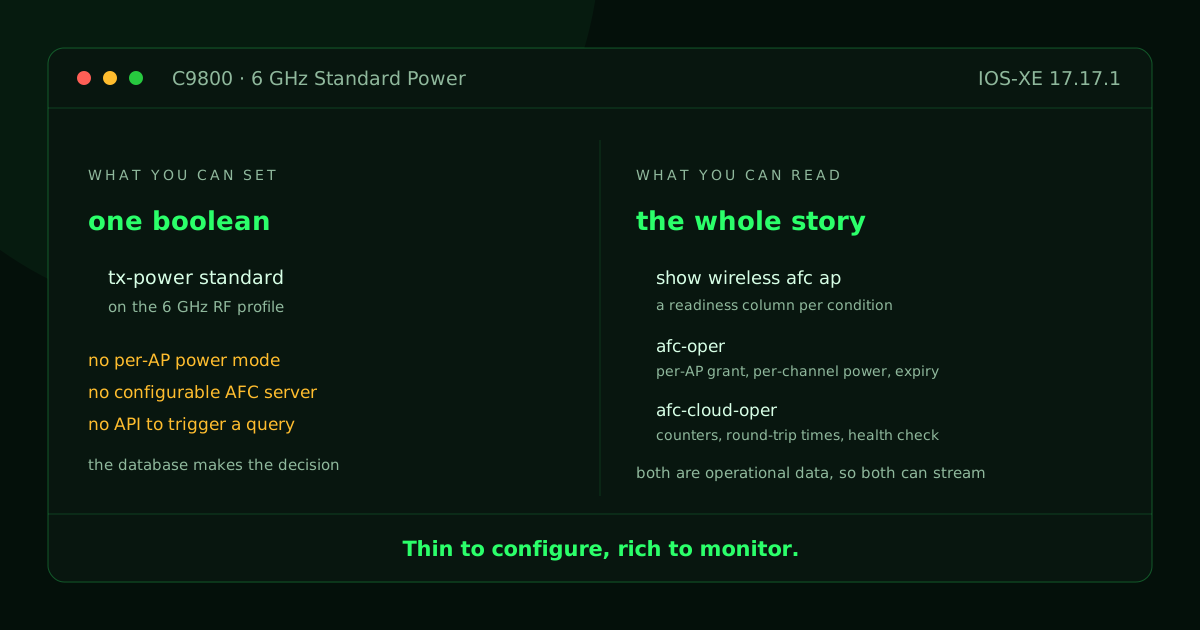
You can configure one boolean, and that is the entire writable surface.
Cisco shipped AFC support in IOS-XE 17.12.3. The whole writable control surface for 6 GHz Standard Power on the controller is a single on/off bit on the 6 GHz RF profile. There is no per-AP power mode setting, no way to force a specific radio into Standard Power, no configurable AFC server, and no API that triggers an AFC query. You allow Standard Power on a profile, and the controller and the AFC service decide the rest.
That is less alarming than it sounds once you accept what AFC is. The database makes the decision, so there is not much for you to turn. It does change what your tooling should be built for, though. There is very little to automate on the configuration side and a great deal to automate on the monitoring side, which is backwards from how most network automation projects start.
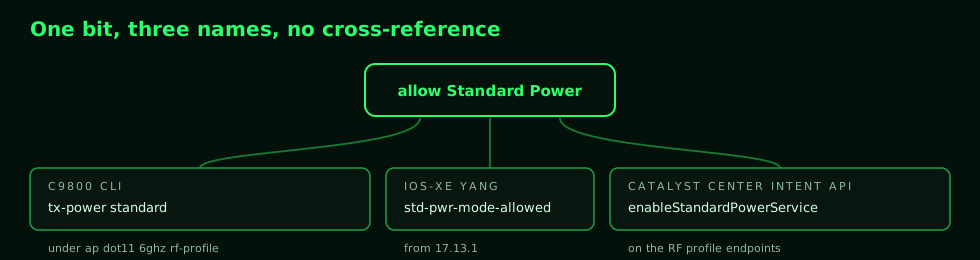
The bit also has a different name on every surface, and none of the three docs mention the other two names.
| Surface | Name |
|---|---|
| C9800 CLI | tx-power standard, under ap dot11 6ghz rf-profile |
| IOS-XE YANG | std-pwr-mode-allowed, in Cisco-IOS-XE-wireless-rf-cfg (present from 17.13.1) |
| Catalyst Center Intent API | enableStandardPowerService, on the RF profile endpoints |
It is the same part with a different part number in the catalog, the shop manual, and on the box, and nobody printed a cross-reference. I verified the first two on the bench. The on-box schema, pulled over NETCONF with get-schema, carries std-pwr-mode-allowed as a boolean defaulting to false, and show running-config all prints the default as no tx-power standard inside the stock 6 GHz RF profile. If you have ever grepped for one of these names, found nothing, and concluded the feature was missing, the likely cause is that you were searching one surface with another surface's name.
What can you monitor?
You can monitor considerably more, and this is where the useful work is.
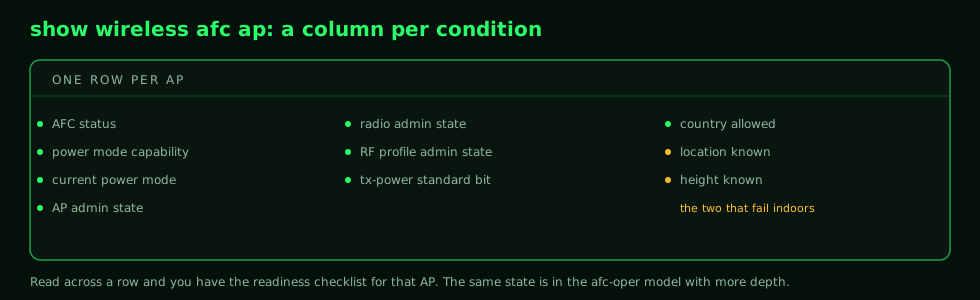
The command show wireless afc ap has a column for every condition an AP must satisfy: AFC status, power mode capability, current power mode, AP and radio and RF-profile admin states, the tx-power standard bit, country allowed, location known, and height known. Read across a row and you have the readiness checklist for that AP, which is a much better troubleshooting experience than most features give you.
Over NETCONF and RESTCONF, two operational models carry the same story with more depth. Cisco-IOS-XE-wireless-afc-oper holds the AFC request and response per AP, including per-channel granted power and the grant expiry timestamp. That expiry timestamp is the one I would put on a dashboard first, because it is the clock from post two made visible.
Cisco-IOS-XE-wireless-afc-cloud-oper holds the service side: message counts, error counts, round-trip times, and a health check block that runs on a timer (every 30 seconds on my bench; Cisco's docs show longer intervals, so do not assume either number). My bench controller, which is not onboarded to Cisco's cloud, reports the precise blocker in that block: not-otp-upgraded, true. Both models are operational data, so they are also candidates for streaming telemetry subscriptions. Whether they support on-change delivery or only periodic polling is the one question I have not been able to settle without a 6 GHz AP on the bench.
The gaps to plan around
Two findings from the research that produced this series are negative results, and they change tooling decisions, so they are worth stating as plainly as the features.
Catalyst Center exposes the Standard Power bit in its Intent API, but as of the 3.1.6 release it has no API for provisioning the per-AP geolocation that AFC requires. I swept the full 3.1.6 endpoint documentation, 1,393 endpoints, and found no write path for geolocation or coordinates, only a read field for AP height. On that release you can enable the feature by API and you cannot finish the deployment by API, because the location half is GUI or per-controller work. Cisco's newer 3.2.3 SDK adds per-AP geolocation height and uncertainty to the access point configuration write path, so check your release before you build tooling around the gap.
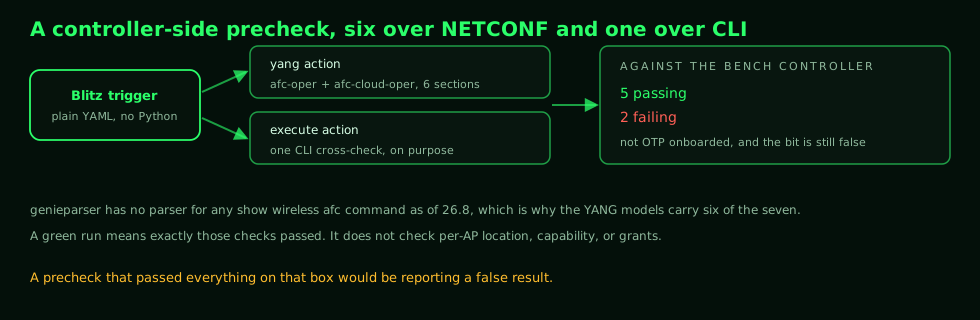
genieparser, the parser library behind pyATS and Genie, has no parser for any show wireless afc command as of version 26.8. A CLI-scraping monitor means writing and maintaining your own parsers, which is a standing tax every time Cisco changes a column header. The YANG operational models above make that unnecessary, which is why the check below runs six of its seven sections over NETCONF, keeping one CLI section on purpose as the no-parser fallback pattern.
A working pyATS monitor
I built the check as a pyATS Blitz trigger: plain YAML, no Python, using the yang action against the two AFC models plus one execute action as a CLI cross-check. It asserts that a get against the AFC model is accepted, that message and health-check error counters are zero, that the country is supported, that the AFC cloud health check reports healthy, and that the RF profile actually allows Standard Power.
One scope note before anyone builds on it. This is a controller-side precheck, and a green run means exactly those checks passed. It does not rule out every controller-side blocker, and it does not check per-AP location, capability, or grants, because those live in the show command and the oper model above.
Against my bench controller it reports five checks passing and two failing, and both failures are true statements: the controller is not OTP onboarded, and the Standard Power bit is still at its default of false. A precheck that passed everything on that box would be reporting a false result, which is a good reason to run a new monitor against a box you know is broken before you trust it against one you think is fine. Easypy gives you the HTML and JSON reporting without extra work, so the output drops into whatever review process you already run.
The testbed, trigger YAML, and job file are small, and I packaged them with the decision material from this series in a public repo: 6ghz-power-mode-toolkit.
One loose end worth chasing
The on-box RPC model Cisco-IOS-XE-wireless-access-point-cmd-rpc has carried an input leaf called rlp-sp-pwrmode-switch since 17.11.1, described in the schema as a recommendation to switch a radio from LPI to Standard Power. Cisco documents it nowhere that I can find.
On my 17.17.1 bench the enclosing RPC is registered and callable. A misspelled RPC name is rejected at the protocol layer, while the real name is accepted and validated field by field, which is the behavior of a live handler rather than a leftover schema entry. What I could not test is the effect, because my joined APs have no 6 GHz radios. If you have a 9136 or 9166 joined to a lab controller, that RPC is the most interesting unanswered question in this whole area, and I would like to compare notes.
The rest of the series
- Choosing a 6 GHz Power Mode: Low Power Indoor or Standard Power.
- What AFC Requires From a Standard Power Access Point.
- Why 40 MHz Is the Right Default Channel Width in 6 GHz.
- Configuring and Monitoring 6 GHz Standard Power on a Catalyst 9800, Programmatically (this post).