What AFC Requires From a Standard Power Access Point
Second post in the 6 GHz power mode series. The first post covered the LPI versus Standard Power decision and the three things every design pays for: power, spectrum, and operations. This post is about the operations bill. Automated Frequency Coordination is the system a Standard Power AP must satisfy before it may transmit at all, and it is where an indoor deployment gets complicated.
Who is AFC protecting, and where did it come from?
The 6 GHz band has incumbents: licensed users who were there first, chiefly fixed point-to-point microwave links. The regulatory deal that opened the band to Wi-Fi requires that unlicensed devices at higher power provably avoid interfering with them. (Satellite receivers use the band too, but the FCC decided AFC was not needed to protect them and instead capped how much power an outdoor Standard Power AP may radiate skyward.)
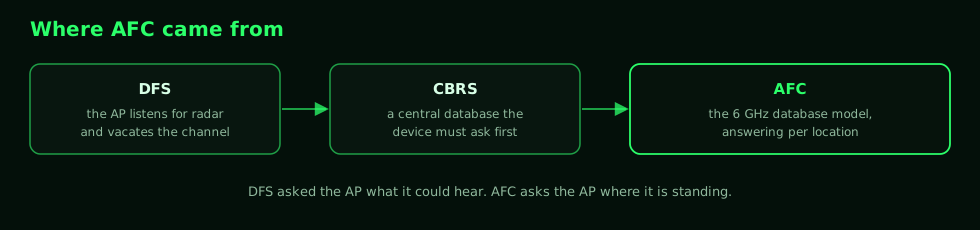
AFC is the enforcement mechanism, and it follows a lineage you have already worked with. DFS made 5 GHz APs listen for radar and vacate the channel when they heard it, which put the detection job on the AP itself. CBRS changed the model by adding a central database that devices had to ask before transmitting. AFC is the 6 GHz version of that database model: a cloud service that knows where every registered incumbent is, evaluates each AP's request, and hands back a list of channels and power levels that AP is allowed to use at that location.
The distinction between those two models is worth holding onto, because it explains most of what follows. DFS asked the AP what it could hear. AFC asks the AP where it is standing.
The request and the 24-hour reauthorization
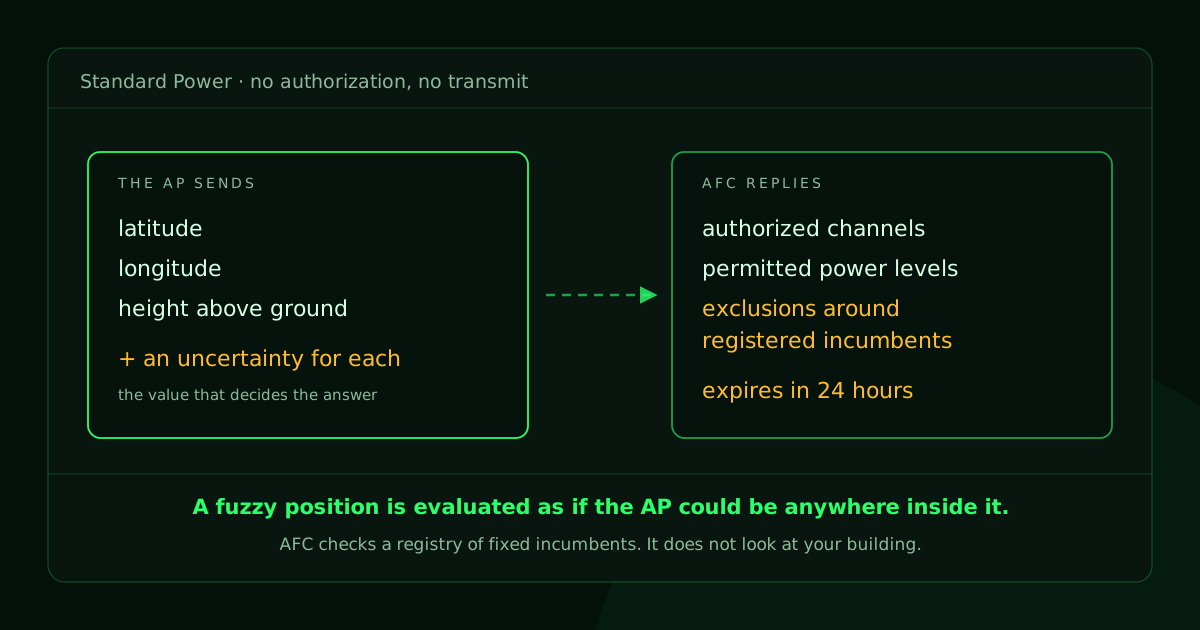
Before transmitting at Standard Power, the AP must send the AFC service its position in three dimensions: latitude, longitude, and height above ground, each with a stated uncertainty. The service checks that position against the incumbent database and returns a grant.
The grant is not permanent. The AP reauthorizes every 24 hours, and the answer can change between one check-in and the next. That is a different operational posture than anything else in your wireless stack, because the thing that decides your channels and your power is not in your building and does not answer to your change process.
What happens when the grant does not come back?
That depends on the hardware, and you need to know which behavior yours has before you build a coverage plan on top of it.
If the AP cannot reach the service, cannot produce a usable location, or fails its check-in, it does not keep transmitting at Standard Power past the grace period the rules allow. Cisco's dual-mode indoor APs drop to LPI, with LPI's lower power and the smaller cells that come with it. An AP built for Standard Power only, like some outdoor models, has no LPI to drop to, and its 6 GHz radio goes quiet instead.
Both of those are the right engineering decision and both are an operational problem, for the same reason. The AP stays up, stays joined, and keeps answering your monitoring. What changed is the power mode, and a coverage plan that only closes at Standard Power has just developed holes that nothing in your alerting is looking for. Confirm which behavior your AP has, and design so your worst-case coverage survives it either way.
This is the part I would weigh most heavily as an operator. Channel and power decisions that used to belong entirely to your RRM now partially belong to an external database you do not control. That is workable, but only if you monitor it, which is what post four is about.
Why is indoor location the hard part?
Because the coordinate AFC cares about most is the one a building is worst at giving you.
Reporting latitude, longitude, and height sounds simple until you try it on the fifth floor of a concrete building. GNSS does not reliably penetrate indoors, and height above ground is exactly the coordinate a microwave link running past your window at rooftop height cares about. A street address gets you two of the three, and the third one is the one that decides whether you are pointed at somebody's link.
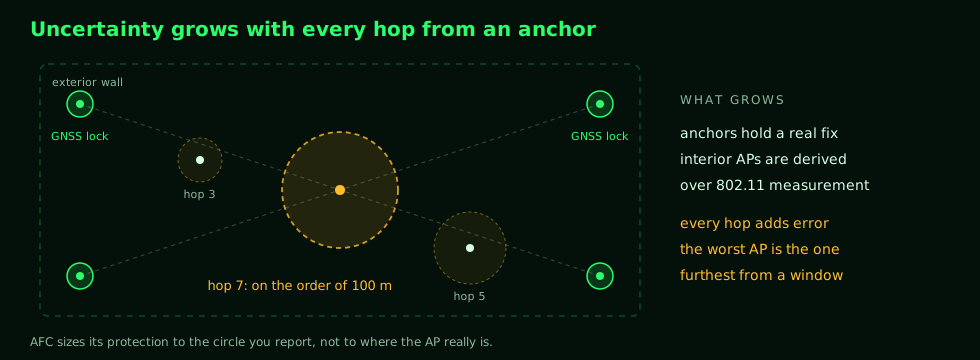
The vendor workaround is anchoring. A few APs near windows or exterior walls hold a GNSS lock, and the rest of the fleet derives its position from those anchors over 802.11 measurement protocols. The catch, raised on the Tech Field Day podcast that prompted this series, is that uncertainty grows with every hop away from an anchor. An AP seven hops in may carry an uncertainty radius on the order of a hundred meters.
Here is why that number hurts. The AFC treats uncertainty as risk, so a fuzzy position gets evaluated as if the AP might be anywhere inside that radius. It is the difference between giving a delivery driver a street address and giving them a zip code. With the address they go to one door. With the zip code they have to plan for the whole area, and you get the answer that works everywhere in it rather than the answer that would have worked at your door. A restricted grant on one AP can then push a channel change that ripples through the plan around it.
So location accuracy is the input that decides whether Standard Power was worth turning on in the first place, and it is worth pricing that work before you commit to the mode.
The upside-down V
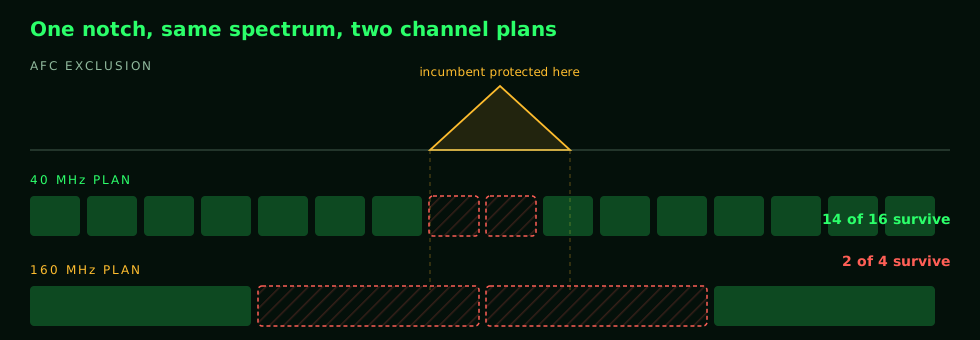
On a channel chart, LPI can occupy spectrum right up against restricted frequencies. Standard Power cannot. The AFC carves exclusion notches around incumbent frequencies, and the protection curve widens as power rises, which is why people describe it as an upside-down V cut out of the band.
The notch punishes wide channels out of all proportion to its size, and the reason is contiguity. A channel has to be one unbroken block of spectrum. An 80 or 160 MHz channel needs a large contiguous block, so if a notch clips any part of that block, the whole channel is unusable. There is no such thing as a 155 MHz channel. A 20 or 40 MHz plan can route around the notches and keep its reuse intact, which is why narrow plans survive grants that would gut a wide one. This is the spectrum you spend when you buy Standard Power, and post three works through what it does to a real channel plan.
What does AFC not do?
It does not look at your building.
AFC checks the request against registered, fixed incumbents, and that is the entire job. It does not see the wireless microphone kit and camera rigs that show up in your auditorium on event day, because those are not incumbents and are not in the database. Local interference remains your problem, detected and handled by your own infrastructure, in both modes.
Think of it like a building permit office rather than a site inspection. The permit office checks your plans against the map of what is already recorded, and it is very good at that. Nobody drives out to see what somebody parked on your street this morning. AFC coordinates you with the registry. It does not coordinate you with the room you are standing in, and the name invites people to assume otherwise.
Bench notes from a Catalyst 9800
Two operational details from my own lab work on a 9800-CL running 17.17.1. First, the virtual controller cannot talk to the AFC service until it is onboarded to Cisco's cloud with a one-time-password token import, and the config guide's prerequisites include DNS, outbound HTTPS, and OCSP reachability from the controller. If you are standing one of these up in a lab and wondering why nothing is happening, work that list before you go looking for RF problems.
Second, the controller checks AFC service health on a timer (my bench showed a 30-second cadence; Cisco's documentation shows longer intervals, so measure your own controller rather than assuming either number) and reports its state in a readable field. My bench unit reports the exact blocker: not onboarded, not OTP upgraded. That is genuinely useful, because it means the controller will tell you why Standard Power is unavailable instead of leaving you to infer it. Post four covers how to read that over NETCONF instead of a console.
The rest of the series
- Choosing a 6 GHz Power Mode: Low Power Indoor or Standard Power.
- What AFC Requires From a Standard Power Access Point (this post).
- Why 40 MHz Is the Right Default Channel Width in 6 GHz.
- Configuring and Monitoring 6 GHz Standard Power on a Catalyst 9800, Programmatically.