Choosing a 6 GHz Power Mode: Low Power Indoor or Standard Power
This is the first post in a four-part series on 6 GHz power modes. This one covers the decision itself. The next two cover AFC and channel width, and the last one covers how to configure and monitor all of it programmatically on a Catalyst 9800.
The FCC opened 1,200 MHz of 6 GHz spectrum for unlicensed use in the US, and every enterprise AP you deploy in that band runs in one of two infrastructure power modes: Low Power Indoor (LPI) or Standard Power. (The rules define two more device classes, very low power and geofenced variable power, but neither is how you deploy enterprise APs today.) The mode is a real architectural decision. It changes your coverage, your channel plan, your client performance, and your operational overhead.
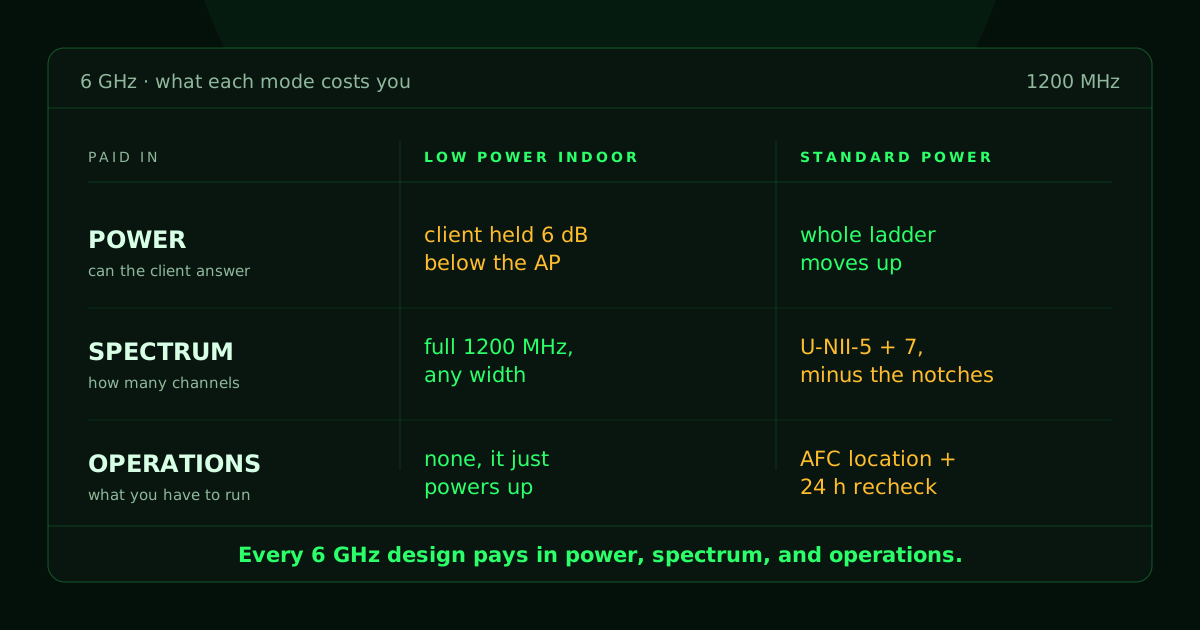
Every 6 GHz design pays for three things, and the mode you pick sets the price on all three: power, spectrum, and operations. Power is whether your clients can answer the AP from where they are actually sitting. Spectrum is how many usable channels you get to keep in your plan. Operations is everything you have to run, watch, and troubleshoot to keep the radios authorized and on the air. Those three come back in every post in this series, so it is worth getting them straight before we talk about either mode.
What does LPI give you?
You get the whole band and the cheapest operations story in wireless, with one string attached on the client side.
An LPI AP needs no coordination with anyone. You mount it indoors, it powers up, and it can use the full 1,200 MHz, including channels right at the band edges. There is no registration, no location reporting, and no periodic check-in. The AP is the entire system, which means there is nothing external that can take your channels away at three in the morning because a database somewhere changed its mind.
LPI's power limit also works differently than the 5 GHz rules you are used to, and this is worth slowing down on, because it is where 5 GHz instinct leads you wrong. In the 5 GHz bands enterprise channels mostly live in (U-NII-1 through U-NII-3), a total-power cap does the limiting. Doubling your channel width meant listening to 3 dB more noise on the same total power, so wider channels cost you SNR, and narrowing a channel was how you bought the cell edge back. In 6 GHz LPI, the binding limit is power density instead, so the rules allow the AP 3 dB more power each time the channel width doubles, up to the band's total cap. On paper the noise penalty and the power allowance cancel out, so an AP that spends that allowance can hold its SNR from 20 MHz all the way up through 160 MHz.
That is a real change in how you design rather than a footnote in a regulatory table. It makes LPI the stronger mode for wide channels and raw throughput, and it means the old reflex of narrowing a channel to protect the edge of the cell does not buy you what it used to.
Why is the client penalty the thing that bites?
Because the client is the half of the conversation you do not control, and the rules make it the quieter half.
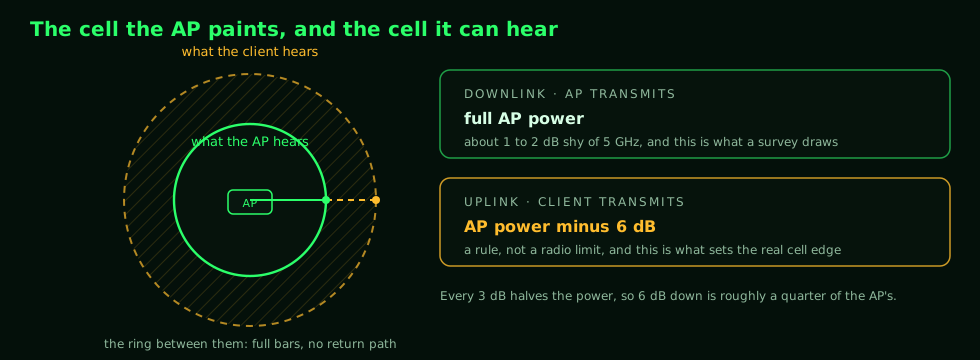
Under LPI rules, client devices get their own power ceilings, set 6 dB below the AP's ceilings. The AP talks at full volume and the phone answers at a lower one. Six decibels is not a rounding error, either. Every 3 dB is a halving of power, so a client held 6 dB down is transmitting at roughly a quarter of what the AP is allowed to use.
Think about shouting across a parking lot at somebody holding a megaphone. You can hear them clearly from the far end without any trouble at all. They cannot hear you answer from that same spot, because you do not have a megaphone. That is an LPI cell. The coverage you can draw on a map is the megaphone's range, and the coverage you can actually use is yours.
That asymmetry produces coverage holes with a shape worth learning to recognize, because on a survey it looks like something else entirely. The client hears the AP fine, so the signal bars look healthy and the device associates without complaint. The AP cannot hear the client back, so uploads stall, calls degrade in one direction, and retry counts climb while the help desk stares at a perfectly good RSSI. On paper, free-space path loss says a 6 GHz cell should run only 1 to 2 dB smaller than the same AP in 5 GHz, which is well inside most design margins. In practice the usable cell is smaller than that, because the limiting factor is the client's talk-back power rather than the AP's reach.
What happens when you swap APs one for one?
Holes open between the drops that the 5 GHz design never had.
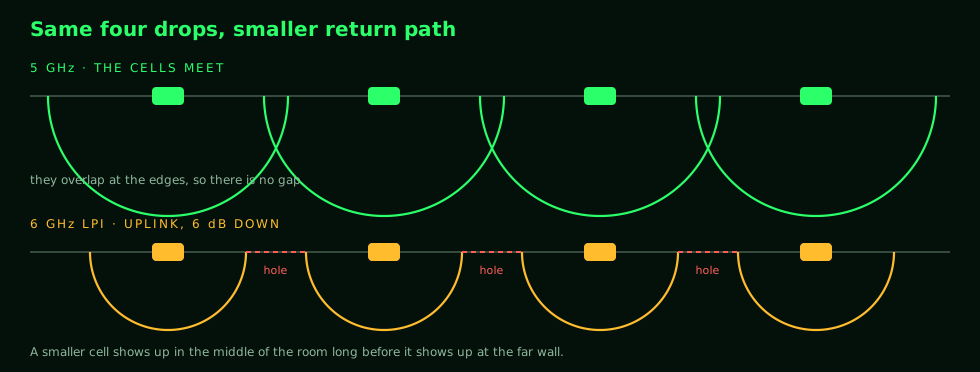
The most common 6 GHz migration plan is a rip and replace. Pull the old 5 GHz AP off the ceiling, hang a 6 GHz AP on the same cable drop, and move on. Nobody wants to pull new cable, and that is a defensible position rather than a lazy one. The cable, the mount, and the switch port are already paid for, and the difference between a swap and a recable is the difference between a change window and a construction project.
The problem is that those drops were spaced for a 5 GHz cell. Under LPI the client penalty shrinks every cell, and a smaller cell shows up in the middle of the room long before it shows up at the far wall, because the space between two APs is where both links are already working hardest.
The durable fix is a redesign: resurvey the space, add drops where the new cells need them, and place APs for 6 GHz propagation rather than for the layout you inherited. When a redesign is off the table, Standard Power is the mechanism that can close the gap without anybody opening a ceiling.
What does Standard Power change?
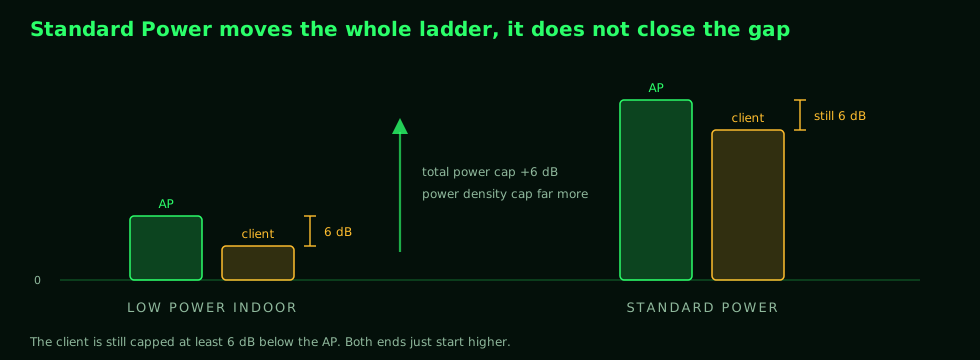
Standard Power raises the power ceilings on both sides of the link: the total-power cap moves up 6 dB, and the power-density cap moves up far more. The client rule itself does not go away. A client is still capped at least 6 dB below the AP's authorized power. But the whole ladder moves up, so with a sufficient grant a client can transmit louder than LPI ever allowed, the AP can hear it at better signal, and the link can negotiate higher MCS rates.
How much of that you actually collect depends on the grant, the channel width, and what the client hardware is willing to spend, since phones also manage power for battery and exposure. The rules set a ceiling. The handset decides how close to that ceiling it wants to get, and it has its own reasons for staying below it.
The payoff is airtime. Faster transmissions get on and off the air sooner, and airtime is the scarcest resource in Wi-Fi, so that efficiency compounds in high-density spaces. A crowded room is usually limited by time on the air rather than by signal, which is why the gain shows up in an auditorium and barely registers in a private office.
What does Standard Power cost?
It costs you the other two of the three, spectrum and operations.
On the operations side, Standard Power requires Automated Frequency Coordination. The AP must report its location and height, with a stated uncertainty, to an external database and reauthorize every 24 hours before it may transmit at the higher power. Post two covers what that involves and where it gets difficult indoors.
On the spectrum side, Standard Power only operates in part of the band (U-NII-5 and U-NII-7 in the US), and the AFC applies exclusion masks around incumbent users on top of that. Between them, those two things remove channels from your plan, and the loss hits wide channels hardest. Post three covers why that pushes you toward 40 MHz.
The trade, stated plainly
The panel on the Tech Field Day podcast that prompted this series framed the choice as a purchase, and I think the framing holds up. LPI buys you spectrum: maximum channels, wide widths, and no external dependency, at lower power and with the client penalty. Standard Power buys you transmit power: more client talk-back and better MCS rates, and it spends spectrum and operational simplicity to get there.
You have one budget and two ways to spend it. There is no configuration where you get both.
| You should lean | When |
|---|---|
| LPI | You are doing a new design and can place APs where they belong, your clients sit close to the APs, you want wide channels, and you have no appetite for AFC operations. |
| Standard Power | You are replacing APs on existing drops, your coverage holes trace back to client talk-back, you are covering large open spaces, or your design is already built on 20 or 40 MHz channels. |
Where to start
Start with the clients rather than the APs. Look at what is actually associating and what it is sending, because that tells you whether you have a talk-back problem or a throughput problem, and those two point at different modes.
Then pick your channel width before you pick your power mode. In 6 GHz the width constrains the mode, so choosing the mode first means you made the width decision without looking at it.
Then check whether the cell is lopsided in the building you actually have. A passive survey shows you what the AP puts on the floor, which is the direction the rules did not touch. Pull the AP's view of a real client instead: received signal at the AP, uplink MCS, and retry rate.
Neither mode is the right answer in general. Run the numbers for your site, your clients, and your cabling reality, and pick the mode that fixes the problem you actually have. The next post covers what you sign up for operationally when that answer is Standard Power.
The rest of the series
- Choosing a 6 GHz Power Mode: Low Power Indoor or Standard Power (this post).
- What AFC Requires From a Standard Power Access Point.
- Why 40 MHz Is the Right Default Channel Width in 6 GHz.
- Configuring and Monitoring 6 GHz Standard Power on a Catalyst 9800, Programmatically.